 BTGuard
WireGuard VPN Setup on Linux
Setup Instructions
Here are some GUI instructions specific to some distros:
- Ubuntu
- CachyOS
If your favorite one is not yet listed above, just let us know and we'll add it here for you.
For Command line Instructions for any distro:
- 1. Go to the Wireguard config generator
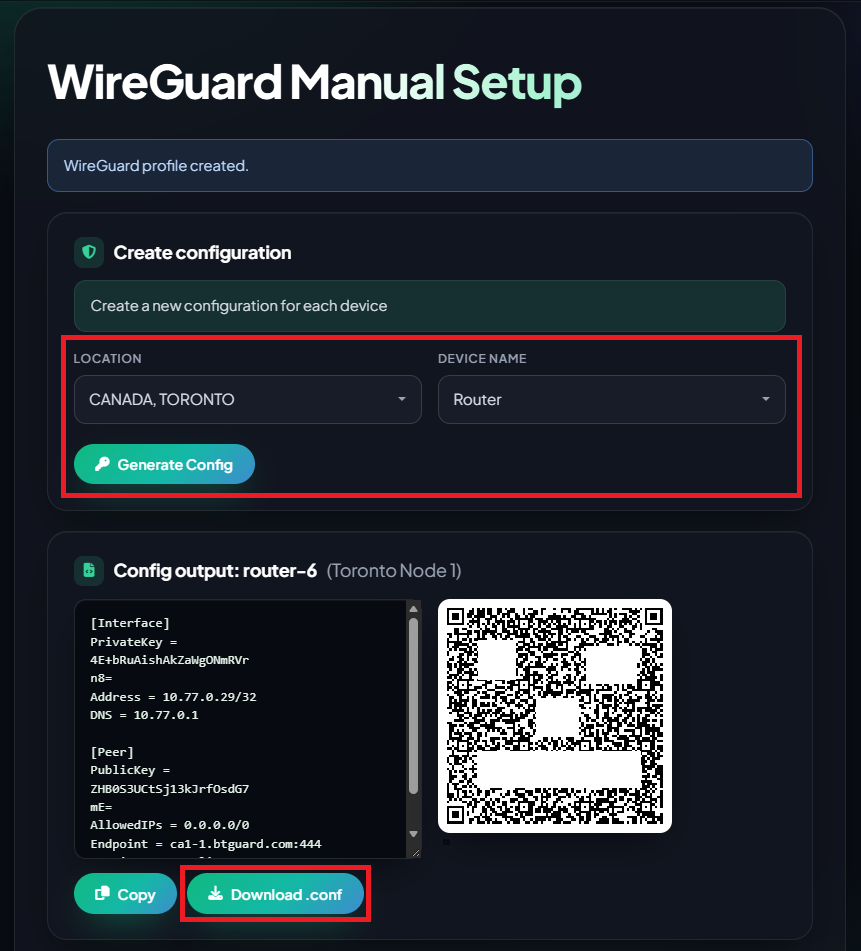
- 2. Select the Location you'd like to use and the Device Name
- 3. Click on Download .conf and save it in your Downloads folder.
- 4. Open a Terminal and run:
nmcli connection import type wireguard file ~/Downloads/your-file.conf
In the command line, replace your-file.conf with the actual name of the file you downloaded. For example, if your file is called ca1-1-laptop.conf type:
nmcli connection import type wireguard file ~/Downloads/ca1-1-laptop.conf
- 5. Now click the Network Icon in the top-right or bottom-right corner of your screen. Your VPN should appear in the list and you can toggle it ON or OFF from there.