 BTGuard
OpenVPN VPN Setup on Linux
Setup Instructions
Connect to BTGuard with OpenVPN on any Linux distro. Download a ready-made .ovpn file from our config generator, then import it with NetworkManager or run it from the terminal.
Install OpenVPN
Install OpenVPN and the NetworkManager plugin for your distro:
Debian / Ubuntu / Mint
sudo apt update && sudo apt install openvpn network-manager-openvpn-gnomeFedora
sudo dnf install openvpn NetworkManager-openvpn-gnomeArch / CachyOS
sudo pacman -S openvpn networkmanager-openvpnAlready have OpenVPN installed? Skip to the next section.
Download your config
- 1. Go to the OpenVPN config generator
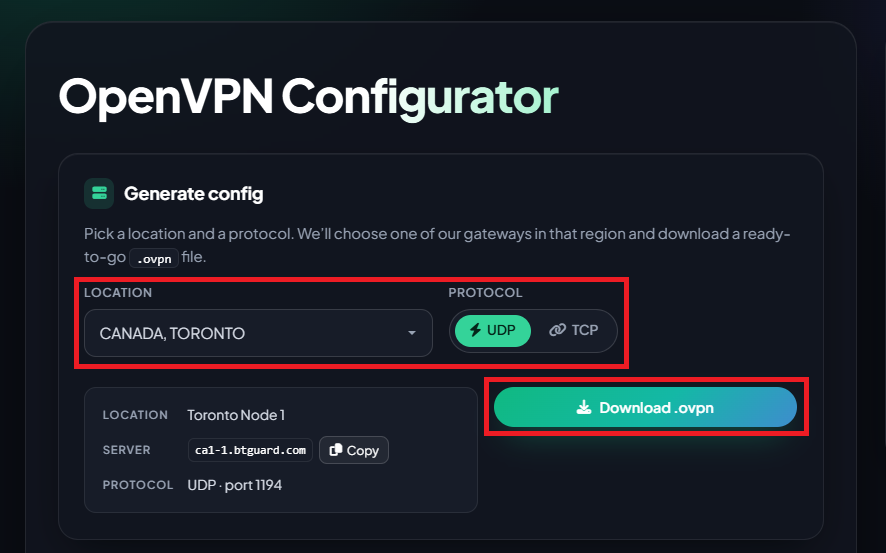
- 2. Select the Location and Protocol you want.
- 3. Click Download .ovpn and save the file to your Downloads folder.
Use UDP unless you need TCP (restricted networks). TCP uses port 4433.
Import with NetworkManager
This works on most desktop distros (Ubuntu, Mint, Fedora, and others):
- 4. Open a terminal and import your profile. Replace
your-file.ovpnwith the file you downloaded:
nmcli connection import type openvpn file ~/Downloads/your-file.ovpnFor example, if your file is called btguard-ca1-1-udp.ovpn:
nmcli connection import type openvpn file ~/Downloads/btguard-ca1-1-udp.ovpn- 5. Click the network icon in your system tray. Your VPN should appear in the list — toggle it on to connect.
Repeat the generator and import steps for each location you want saved.
Command line (optional)
On a server or a distro without NetworkManager, connect directly:
sudo openvpn --config ~/Downloads/your-file.ovpnYour login credentials are already inside the downloaded file, so you will not be prompted for a password. Press Ctrl+C to disconnect.
You are now connected!
If you're using qBittorrent, change these settings.